

Key Takeaways
- Manual disaster recovery (DR) runbooks drift out of date the moment you save them, and configuration drift is the single most common reason recovery fails when it matters.
- Automation removes the manual execution tax, cutting recovery from a best-effort, multi-hour timeline down to a predictable
- Orchestration runs your recovery steps in the right order with conditional logic, so dependent systems return in sequence instead of all at once.
- Human-in-the-loop approval gates and deep health checks protect against false failovers, keeping IT in control of the calls that matter.
It’s the middle of the night and your primary site just went dark. You open the disaster recovery runbook you wrote six months ago, and the first step tells you to connect to a server at an IP address that no longer exists. Now you’re 20 minutes in, and you’re not even sure you’re on the right box yet.
Automated system recovery is a software-driven process that boots recovery environments and restores systems in a predefined, orchestrated sequence, replacing the manual, step-by-step execution of a disaster recovery runbook. It swaps out the static, step-by-step document with dynamic, software-defined resilience that executes the same way every time.
Here’s the problem with the manual approach: A disaster recovery plan is only as good as its last update, and your infrastructure changes hourly. Servers get patched, IP addresses shift, and cloud environments scale. A manual runbook is a snapshot of an environment that has already moved on. That gap is expensive. According to Splunk’s 2026 Hidden Costs of Downtime research with Oxford Economics, downtime now averages $15,000 per minute, and with human error ranking as the leading cause across the technology stack, 66% of IT operations and engineering leaders are prioritizing automation to reduce it. This article breaks down where manual runbooks fail, what automated recovery and orchestration actually do, and how to make the switch without giving up control.
The Core Vulnerabilities of Manual DR Runbooks
A manual runbook assumes two things that rarely hold true during a real outage: That the document still matches your environment, and that the right people are available to execute it flawlessly under pressure. When either breaks, your recovery stalls. And these three vulnerabilities cause the most damage.
Configuration Drift
Every patch, IP change, security-group tweak, or cloud scaling event means someone has to go back and update the runbook. Nobody enjoys documentation, so it slips. This is the single biggest failure point in real disasters: You reach for the disaster recovery plan and the environment it describes no longer exists.
The Stakeholder Gap
A good runbook is equal enough that anyone can pick it up and run it, from a teammate to a contractor brought in at the last minute. That includes non-technical calls. If the banking app goes offline, who decides to fail over to the secondary site? It’s rarely the backup admin. The runbook needs the right contacts and information written in terms each decision-maker understands. Without it, recovery waits while people hunt for whoever holds the answer.
The Human Error Tax
Under a ticking SLA timer, small mistakes multiply: A command pasted into the wrong server window, a step mistyped from a printed page, a software package version assumed to be 9.8 when it’s actually 8.9. Every manual step is one more place something can break, and stress makes those errors more likely.
There’s a quieter cost too. Testing a manual runbook means giving up evenings and weekends and pulling people into a room to run it by hand. It takes so long that most teams avoid it, so the runbook stays untested until the day it fails. Building this into a broader business continuity and disaster recovery plan only works if that plan is actually exercised.
Anatomy of a Failure: A Manual DR Runbook Example
For example, a single step in a legacy runbook might look like:
Step 4.2: Log into the AWS Secondary Console.
Navigate to EC2. Manually change the elastic IP
mapping for App-Server-01 to 192.168.1.55.
Verify database integrity before proceeding.
It looks reasonable at a glance. Under pressure, it fails in three ways:
- Hardcoded dependencies: That IP, 192.168.1.55, is frozen in time. If a migration changed the architecture three weeks ago, the step breaks instantly, and you may burn 20 minutes just confirming whether you’re even on the right box.
- Ambiguous instructions: “Verify database integrity” means nothing concrete at 3 a.m.. Verify how, and against what? Automation runs a programmed health check with a pass or fail result. A stressed engineer makes guesses, or skips it altogether.
- No real-time rollback: If Step 4.2 fails halfway, manual runbooks rarely tell you how to unwind a partial failover, leaving the environment stuck in a corrupted, half-migrated state.
These aren’t hypothetical. It’s not an uncommon scene when systems are down, and nobody can continue recovery until they find the one person with the required password or authority.
What Is Automated System Recovery and Orchestration?
Automated disaster recovery has two working parts, and it helps to separate them.
Automation means the system does the work on its own: You push the button, and it executes the steps for you instead of a human running each one by hand. Orchestration means those steps run in the right order. One system depends on another, which depends on another, so recovery has to follow a defined sequence rather than firing everything at once.
|
|
Automation |
Orchestration |
|
What it does |
Runs the steps for you |
Runs the steps in the right order |
|
Answers |
“Do it” |
“Do it in this sequence” |
|
Example |
Recover a single VM |
Bring the database up before the web servers, then verify |
|
Without it |
You execute every command by hand |
Systems come back in the wrong order and break dependencies |
Put them together and you get the full picture. You define the logic once: Bring the database layer up before the web servers, run this health check before proceeding, and if a step fails, fall back to a smaller recovery action instead of stopping cold. From then on, the platform takes those defined steps and runs them in sequence, automatically. That’s the difference between holding a list of things you need to go and do versus pressing a button that does them for you.
This is where standalone scripts fall short. A script can automate a single task, like backing up one VM, which is closer to cloud orchestration at the task level.
True disaster recovery orchestration coordinates the entire choreography of a multi-tier application: The boot order, dependencies, network mapping, and security checks that have to happen in a specific sequence for recovery to actually work. It’s a core part of modern IT transformation, automation, and resilience, and it’s the difference between automating a single step versus the whole recovery.
Four Technical Advantages of Disaster Recovery Automation
The benefits of automating disaster recovery go beyond speed. For IT leadership, the real value shows up in consistency, testability, and the ability to prove recovery works before you ever need it. Here are the four advantages that matter most.
Adherence to Dependency Mapping and Ordering
Automation doesn’t map your dependencies for you. You still build that logic: Which systems come up first, what depends on what, and where the conditional fallbacks sit. The value is that once you’ve built and tested that sequence, the platform executes it exactly the same way every time, taking human error out of the equation on the day it counts. You’re not reconstructing the boot order from memory at 4 a.m. You’re running a plan you already validated, and that’s what makes recovery repeatable through practices like instant backup and recovery.
Scheduled DR Testing and Readiness Checks
This is where automation quietly changes the math. Testing a manual runbook eats evenings and weekends. Automated testing runs on a schedule, , without touching production. You schedule it to test itself on a Saturday night and come in Monday morning to an email that says it passed or failed.
Two distinct things are happening here, and it’s worth separating them:
- Scheduled testing boots your production backups in a sandboxed environment, runs integrity checks to confirm the applications actually come up, and does it on a cadence you set, often weekly.
- Readiness checks run far more frequently, every hour or every few hours, and confirm something simpler but critical: Do you have the resources and targets available to fail over to? You’re not running a full test each time, just verifying you’re ready to when needed.
Together they close the gap between “we think we can recover” and “we know we can,” and they align with broader enterprise backup and recovery best practices.
Failback Automation
battle. Once your primary infrastructure is stable again, you have to return operations to it without losing data or creating dual-production conflicts, where two environments think they’re live at once. Failback automation handles the return trip: It syncs the delta changes made during the outage back to primary hardware, then switches traffic back once stability is verified. Doing this by hand is slow and risky. Automating it means the second half of the disaster is as controlled as the first.
Instant Compliance Logging and Audit Trails
Every automated execution generates a clean record: The exact steps taken, when they ran, and what the results were, including Recovery Time Actuals (the real recovery times you hit, not the ones you hoped for). That record does two jobs. It gives you post-event analytics to improve the plan, and it hands auditors a ready-made compliance report instead of weeks of forensic log reconstruction. Proving recovery happened becomes a byproduct of running it, not a separate project.
Achieving Precision RPO and RTO Automation and Proving It
Manual recovery makes strict service-level agreements almost impossible to guarantee, because every manual step introduces variable delay. How long recovery takes depends on who’s executing, how fast they find the right password, and whether the runbook still matches reality. That variability is the enemy of a predictable RPO or RTO.
There are two sides to this, and strong automation delivers both.
Achieving it: An automated failover triggers algorithmic health checks rather than a human noticing that something’s wrong. Recovery sequences launch at machine speed, which drops RTO from a best-effort, multi-hour, manual timeline down to a predictable window. You’re not hoping to hit the SLA. You’re engineering for it.
Proving it: Achieving a fast RTO means nothing if you can’t demonstrate it. Because automated testing captures Recovery Time Actuals every run, you can show, with data, that you consistently recover within your target window. That’s the difference between telling leadership “we think we’re in good shape” and handing them evidence that’s tested and proven. You can dig deeper into setting realistic targets in our guide to recovery time objective strategies.
This speed raises a fair concern, and it’s the one that keeps most IT teams cautious about full automation: What about false alarms? A temporary network blip shouldn’t turn into a full-site failover. The safeguard is straightforward: Failover isn’t triggered automatically off application monitoring. Automation handles the execution, but systems do often provide the flexibility to add a human into the loop. Health checks still do real work, verifying that applications and dependencies come back during a test or a live recovery, but the decision to failover stays with the team. That’s the middle ground: Machine-speed execution with human authority intact, which matters most in complex hybrid cloud disaster recovery environments.
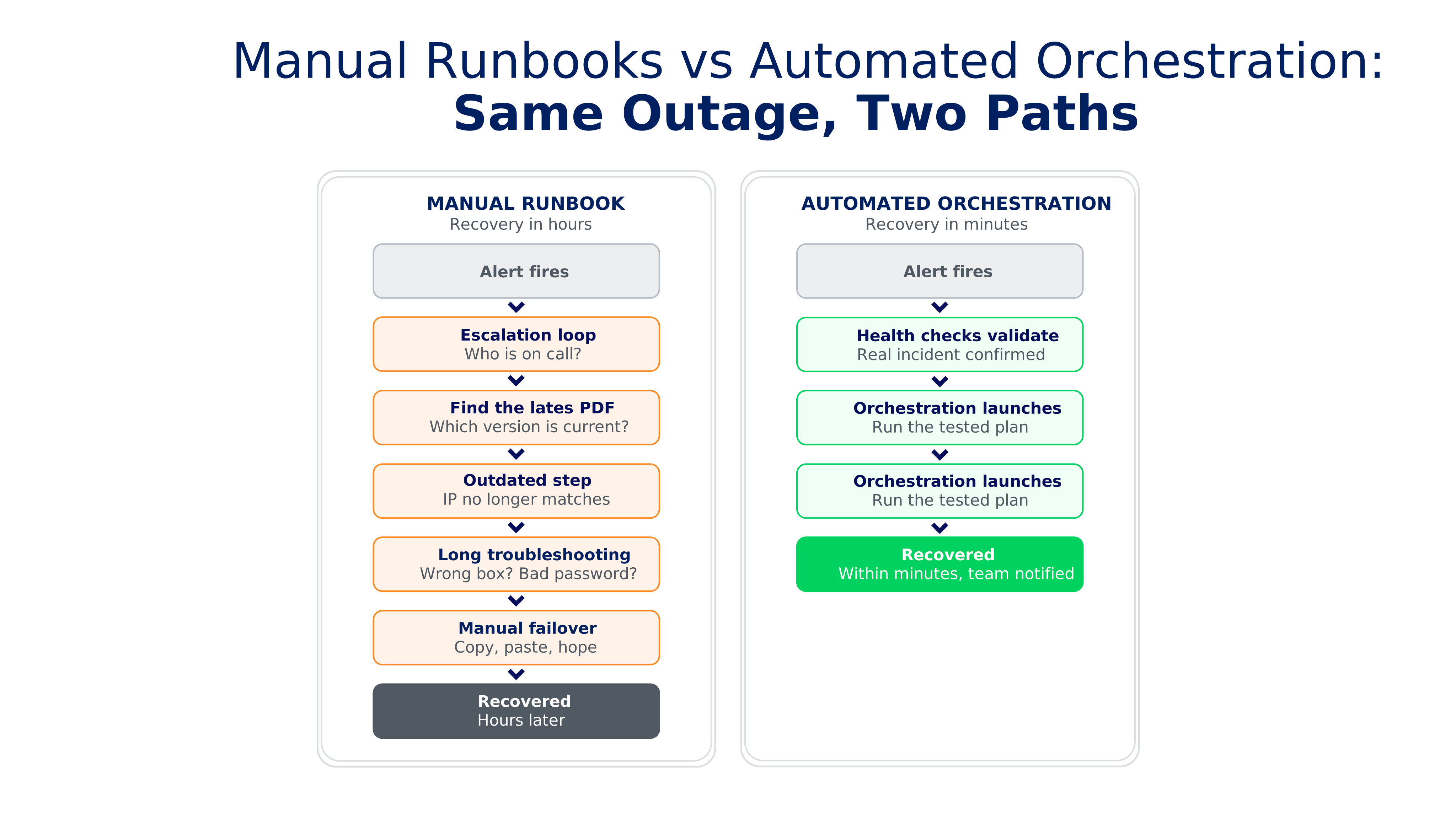
How to Transition From Manual Runbooks to Automation
You don’t have to rip out everything overnight. The move from manual runbooks to automated recovery works best as a phased transition, and the good news is that most of the hard thinking you’ve already done in your existing runbooks carries straight over. Here’s a practical path.
- Inventory and classify your applications. Start by mapping what you have and ranking it by business criticality. A Tier 1 system that costs you money every minute it’s down needs a different recovery posture than a Tier 3 internal tool. This ranking drives every decision that follows.
- Choose a software solution that fits. Automation requires a platform that supports what you’re actually trying to recover, across your specific mix of physical, virtual, and cloud workloads. This is the foundation, so match the tool to your environment before anything else.
- Convert manual steps into code-based workflows. Take the steps already written in your runbooks and rebuild them as DR templates in the platform. The logic you documented by hand becomes an executable, repeatable workflow.
- Implement a hybrid model with manual checkpoints. You don’t have to automate every decision. Keep manual approval gates on high-risk actions, like a full-site failover, so a human stays in control of the calls that matter while the routine execution runs itself.
- Leverage Disaster Recovery as a Service (DRaaS) to offload infrastructure overhead. If maintaining a secondary recovery site is more than your team should carry, DRaaS shifts that infrastructure burden to a provider, so you get a recovery target without managing the hardware behind it.Test, then keep testing. This is the step teams skip, and it’s the one that matters most. Confirm the automated workflow actually works and hits your SLAs. Just as important, get sign-off that the tests cover what the business actually needs to recover, not just what IT assumes matters. Bring the plan to the executives and stakeholders who own those priorities, validate the scope against them, and treat their approval as part of the test itself. Then let the scheduled testing from earlier keep validating it, so the plan stays true to your environment as it changes.
Done in this order, the transition de-risks itself. You’re not betting the business on an untested switch. You’re validating each layer as you build it.
How Veeam Helps
Everything above describes the destination. The good news is that if you already maintain a manual runbook, you’ve done the hardest part: You’ve figured out what needs to recover, in what order, and where it’s pulling from. That’s the real complexity. Moving to automation isn’t about starting over. It’s about taking the plan you already built and handing it to a tool that executes it flawlessly.
Think of it like a recipe. Writing a manual runbook is reading the recipe, gathering every ingredient, and measuring each one out by hand, every single time you cook. Veeam Recovery Orchestrator is taking everything you’ve already measured and simply putting it in the bowl to mix. You did the hard work ahead of time. Now you’re using the right tool to build something with it.
Veeam Recovery Orchestrator turns your recovery logic into orchestrated plans that run the same way every time. It maps directly to the advantages we’ve covered:
- Sequenced, dependency-aware recovery. Group your systems and define the order they come back in, run steps in sequence or in parallel, and add application checks for services like SQL, Exchange, and SharePoint so recovery is verified as it happens, not just assumed.
- Scheduled testing and readiness checks. Test full recovery plans in an isolated DataLab on a schedule, with no impact to production, while readiness checks run separately to confirm your recovery resources and RPOs are in place.
- Automated failback. Return workloads to primary once it’s stable, syncing only the changed data blocks to speed up the trip back and avoid dual-production conflicts.
- Audit-ready reporting. Every plan generates documentation automatically, updated as your environment changes, with RTO and RPO measurements captured on each run. Your compliance evidence writes itself.
Ready to see what orchestrated recovery looks like in practice? Explore Veeam’s approach to building a cyber resilient data recovery strategy and start turning your static runbooks into recovery you can prove.
Frequently Asked Questions
Automated system recovery is a software-driven process that detects infrastructure failure, boots recovery environments, and re-routes traffic without relying on manual human intervention. Instead of an engineer working through a checklist by hand, the system executes the recovery steps you’ve defined, in the order you’ve defined them, at machine speed.
Automation improves recovery objectives in two ways. The first is speed: Once a recovery is initiated, the orchestrated sequence runs at machine speed instead of an engineer working through it step by step. The second, and just as important, is consistency. A manual recovery varies every time, depending on who runs it and whether the runbook still matches reality, so your real RTO is more of a range than a number. Automation executes the same validated steps in the same order on every run, turning that unpredictable range into a repeatable result you can commit to in an SLA.
Disaster recovery orchestration is the centralized management and automated coordination of every moving part in a recovery plan. It goes beyond recovering a single system to align applications, data backups, network configurations, and security verification in a precise, dependency-aware sequence. Automation runs the steps; orchestration makes sure they run in the right order.
Both are driven by software-defined policy triggers. When monitoring detects a primary-site outage, the orchestration engine spins up replicated workloads in a secondary target automatically. For failback, once the primary site is stable again, the system syncs the delta changes made during the outage back to primary hardware and switches traffic back with minimal disruption, all once stability is verified.
Automated DR testing uses isolated, non-disruptive sandbox environments. The software runs scheduled tests that boot production replicas behind a virtual firewall, runs integrity checks to confirm the applications actually come up, and auto-generates compliance-ready logs, all without touching live traffic. That’s what lets you prove recoverability regularly instead of hoping it works when you need it.
The post Why Automated Disaster Recovery Beats Manual Runbooks appeared first on Veeam Software Official Blog.
Originally published on Veeam Software Official Blog ↗