
Today, we’re announcing AWS CloudFormation Express mode, a new deployment mode that accelerates deployments for developers and AI tools iterating on infrastructure. Express mode accelerates deployments by completing when CloudFormation confirms resource configuration is applied, rather than waiting for extended stabilization checks. This reduces deployment time by up to 4 times for iterative development workflows and production scenarios.
How it works
Every CloudFormation deployment performs stabilization checks after resource configuration is applied. These checks serve an important purpose when you need to confirm resources can serve traffic before shifting load.
However, many workflows do not require full stabilization to proceed. Express mode benefits two primary use cases: iterative development workflows and production scenarios where you are comfortable with eventual stabilization. These use cases include iterating on infrastructure configurations during development, testing individual components of your application, and AI-assisted infrastructure development that benefits from sub-minute feedback loops.
With Express mode, CloudFormation completes deployments when resource configuration is applied, without waiting for stabilization checks. Resources continue becoming operational in the background. CloudFormation automatically retries dependent resources that encounter transient failures during provisioning within the same stack, without requiring any customer intervention. This built-in resilience handles timing issues between resources as they stabilize. Express mode changes when the deployment completes, not how resources are provisioned.
For example, when I create an Amazon Simple Queue Service (SQS) queue with a dead letter queue (DLQ), Standard mode takes 64 seconds, but Express mode completes in up to 10 seconds. In the case of deleting an AWS Lambda function with network interface attachment, Standard mode takes 20–30 minutes, but Express mode completes in up to 10 seconds based on my benchmarking test.
Get started with CloudFormation Express mode
When you create a CloudFormation stack in the AWS Management Console, choose Enable in the Express mode under Stack deployment options.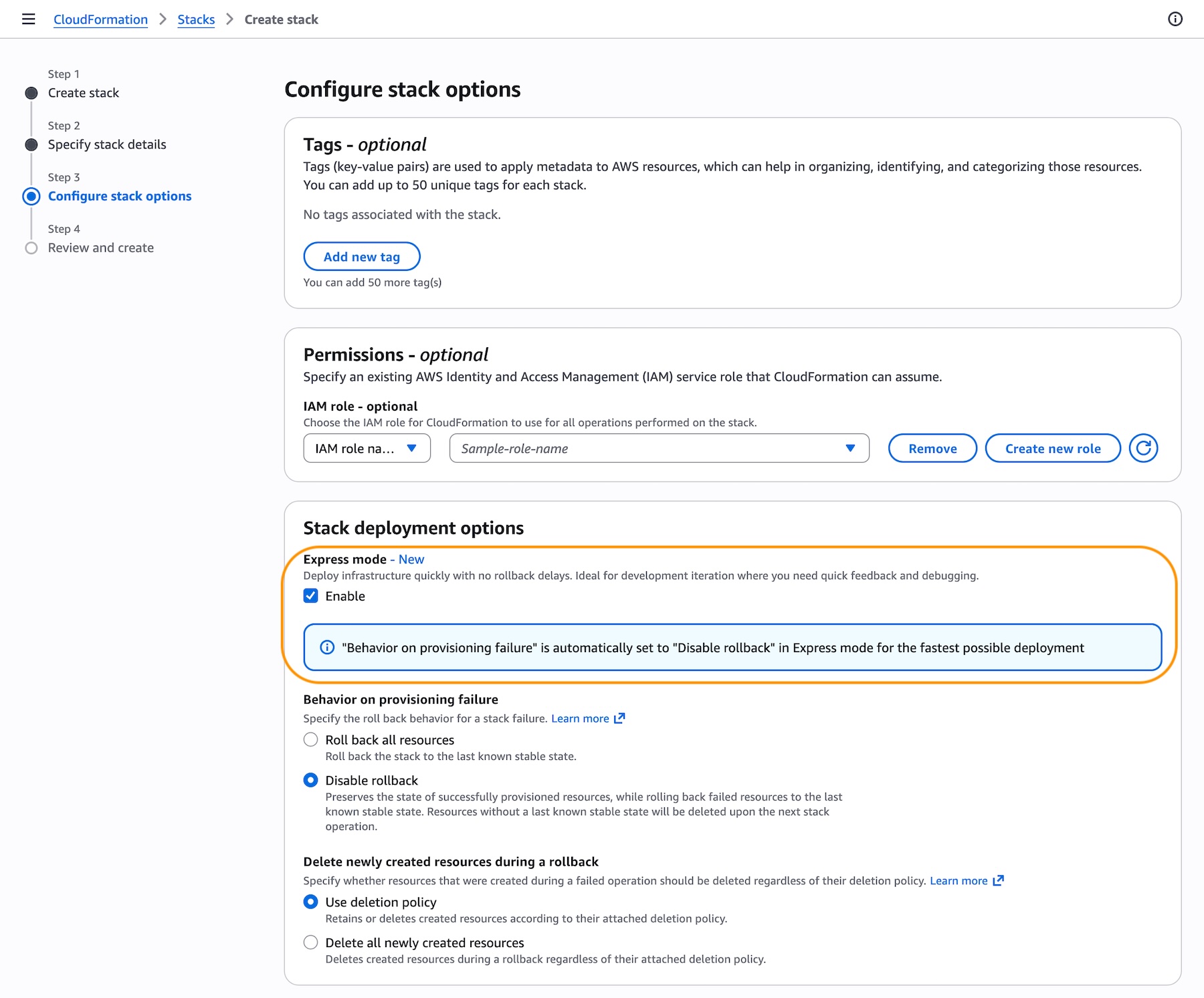
You can also use AWS Command Line Interface (AWS CLI), AWS SDKs, or IaC tools like AWS Cloud Development Kit (CDK), and AI tools such as Kiro.
Activate Express mode by setting the --deployment-config parameter to EXPRESS when creating, updating, or deleting stacks. No template changes are required. Express mode disables rollback by default for the fastest iteration experience. To re-enable rollback, set disableRollback to false in the deployment-config for production environments, or implement monitoring/cleanup mechanisms for failed deployments.
aws cloudformation create-stack \
   --stack-name my-app \
   --template-body file://template.yaml \
   --deployment-config '{"mode": "EXPRESS", "disableRollback": true}' \
For example, use the Express mode when you build infrastructure incrementally, adding resources one at a time. Ensure your IAM role templates follow the principle of least privilege.
# Iteration 1: Deploy IAM role
aws cloudformation create-stack \
--stack-name my-microservice \
--template-body file://iteration1-iam.yaml \
--deployment-config '{"mode": "EXPRESS"}' \
--capabilities CAPABILITY_IAM
--role-arn arn:aws:iam::123456789012:role/CloudFormationDeployRole

# Iteration 2: Add Lambda function
aws cloudformation update-stack \
--stack-name my-microservice \
--template-body file://iteration2-lambda.yaml \
--deployment-config '{"mode": "EXPRESS"}' \
--capabilities CAPABILITY_IAM
--role-arn arn:aws:iam::123456789012:role/CloudFormationDeployRole

# Iteration 3: Add SQS queue and event source mapping
aws cloudformation update-stack \
--stack-name my-microservice \
--template-body file://iteration3-sqs.yaml \
--deployment-config '{"mode": "EXPRESS"}' \
--capabilities CAPABILITY_IAM
--role-arn arn:aws:iam::123456789012:role/CloudFormationDeployRole
For AWS CDK, activate Express mode with the cdk deploy --express command when you deploy your CDK stack. This command retrieves your generated CloudFormation template and deploys it through the CloudFormation Express mode, which provisions your resources as part of a CloudFormation stack.
Express mode works with all existing CloudFormation templates and supports all CloudFormation features including change sets and nested stacks. When you enable Express mode on a parent stack, all nested stacks also use Express mode. If you need resources to be fully operational before proceeding with traffic or testing, continue using the default deployment behavior, which performs stabilization checks before completing.
Now available
AWS CloudFormation Express mode is available today in all AWS commercial Regions at no additional cost. For Regional availability and a future roadmap, visit the AWS Capabilities by Region. If you want to call APIs, search documentation, find regional availability, and check troubleshooting about this new feature, try using the AWS MCP Server and plugins with your preferred AI tool. To learn more, visit the CloudFormation documentation.
Start accelerating your deployments today, and send feedback to AWS re:Post for AWS CloudFormation or through your usual AWS Support contacts.
— Channy
from AWS News Blog https://ift.tt/rol6jkE
Share this content: