
Key takeaways:
- Most small-to-medium sized business (SMB) backup evaluations go wrong because they focus on features, price, or roundup rankings instead of actual recovery outcomes.
- Cloud storage and sync tools are not backup. If deletions, corruption, or ransomware-related changes propagate everywhere, they are not giving you true recovery protection.
- Easy setup is not enough. SMBs should evaluate for Day 2 usability and whether the platform stays manageable after deployment without constant babysitting.
- Strong evaluations should test workload coverage, recovery readiness, operational simplicity, and whether protection methods align to real recovery point objective (RPO) and recovery time objective (RTO) expectations.
- Any serious vendor should be willing to prove restore speed, alerting, ransomware resilience, granular recovery, and pricing behavior during a trial or proof of concept.
If you’re already evaluating small business backup software, you’re probably past the point of needing another article about why backup matters. You already know it does. The harder question is which product will actually help you recover when something breaks, and which one just looks good in a comparison chart. This is where a lot of SMB evaluations go wrong.
Buyers often compare feature lists, scan aggregator roundups, or default to the cheapest option, then assume they have done enough due diligence. However, backup software is not a product you judge by how polished the demo looks or how many boxes it checks on paper. You judge it by whether it can actually restore the right data in the right timeframe with minimal friction when the pressure is real.
This matters even more for SMBs. Lean IT teams do not have time to manage fragile backup tools, perform constant manual checks, or discover restore limitations during an incident. The goal of evaluation is not simply to find software that creates backups; It’s to find software that fits your environment, your recovery expectations, and your team’s actual ability to operate it day to day.
This guide is built for that buying stage. It is not a round up, and it is not a planning guide. It is a practical framework for evaluating SMB backup software based on what matters most: Risk, recoverability, operational simplicity, and coverage.
Why Most SMB Backup Software Evaluations go Wrong
Feature lists, pricing tables, and roundup articles can make products look similar. However, none of those tell you whether your software will actually work when you need to recover.
The following three mistakes drive the worst buying decisions:
1. Choosing Based on Price Before Validating Recovery
The cheapest option often looks the most attractive early in the process, especially for small teams under budget pressure. However, backup software is one of the few categories where a lower upfront price can create much higher operational cost later through downtime, failed restores, manual work, or missing protection during an incident.
A backup platform should not be judged only by what it costs to buy. It should also be judged by what it costs when recovery becomes slow, incomplete, or uncertain.
Another common evaluation gap is assuming all backup methods deliver the same recovery outcomes, when they don’t.
Snapshots, replicas, native retention features, and independent backups all behave differently during recovery. Some are optimized for convenience and short-term rollback. Others are designed for resilient, portable recovery across environments. SMBs should evaluate whether the protection approach actually aligns to their recovery objectives, including how quickly systems need to come back online and how much recent data loss the business can tolerate.
Because the reality is, backup methods are not interchangeable once recovery pressure enters the conversation.
2. Confusing Backup with Cloud Storage or Sync
This is one of the most common and most dangerous evaluation errors. Tools like OneDrive, Dropbox, and similar sync-first platforms are useful, but they are not the same as backup.
Sync tools are designed to keep files consistent across locations and devices. That means changes — including deletions, overwrites, and in some cases encrypted files — can propagate across copies. This is very different from having an independent, recoverable backup designed for restore.
If a product’s main value is storage or synchronization, it should not be evaluated as a backup platform.
3. Mistaking Simple Setup for Long-Term Usability
Some backup tools are easy to deploy but hard to live with. This matters a lot for SMBs.
A platform can look clean during setup while still requiring heavy manual monitoring, frequent policy maintenance, fragmented tooling, or specialized expertise after deployment. In those environments, complexity quietly shifts into your Day 2 operations.
For lean IT teams, that is a major warning sign. Backup software has to stay manageable after rollout, not just during the trial.
The better evaluation question is not:
Does this product back up data?
It is:
Can I recover my business from it, at what speed, and with what level of confidence?
Start Here: What to Establish Before Evaluating Any Vendor
Before comparing vendors, define the environment, recovery expectations, and operational limits the software actually needs to fit. Otherwise, you risk evaluating demos instead of evaluating whether the platform will work for your business in the long term.
| Before the Demo, Establish: | Why It Matters: |
| Critical applications and data | You need a workload inventory across on-premises systems, cloud workloads, SaaS applications, and connected infrastructure so you can evaluate whether the vendor actually protects what matters most. |
| The most likely recovery scenarios | The right solution depends on whether you are recovering from deleted files, mailbox loss, ransomware, outages, corruption, or broader infrastructure failure. |
| Highest-priority business risks | Backup should protect the systems and processes the business cannot afford to lose, not just the workloads that are easiest to demo. |
| Staffing and operational limits | A platform that requires constant oversight or specialized expertise may be a poor fit for a lean IT team. |
| Where automation reduces operational burden | Automation only matters if it removes manual work instead of creating more management overhead. |
Coverage is not simply about checking workload boxes; it’s also about understanding how systems work together during recovery.
Identity, applications, infrastructure, cloud services, and user-generated data often depend on each other to come back in the right order. That is why fragmented protection strategies tend to create recovery friction later, especially during broader outages or cyber incidents.
A good recovery strategy is less about isolated backups and more about coordinated recovery across connected systems.
One Simple Rule
If you have not defined your coverage needs, recovery expectations, business priorities, and staffing limits before the demo, you are not ready to evaluate the vendor fairly.
For deeper planning guidance, go to:
https://www.veeam.com/blog/small-business-backup-strategy.html
The 8 Capabilities That Separate a Reliable Backup Solution From an Adequate One
This is the stage where vendor claims should be tested against operational reality.
Use these capabilities to stress-test what each platform actually delivers:
| Capability | What to Look For | What to Ask the Vendor |
| Broad workload coverage across datacenter, cloud, and SaaS | Support for the workloads you actually run now and the environments you are likely to add later. | “Map your platform to my environment. What is protected natively, what requires another product, and what is not covered?” |
| Automated discovery and policy assignment | The ability to identify and protect workloads automatically instead of relying on manual job creation. | “Show me how a newly added workload gets discovered and protected without manual intervention.” |
| Backup and recovery verification | Automated validation that proves restore points are actually recoverable. | “Show me how your platform verifies restore readiness, not just backup completion.” |
| Immutable storage for zero trust resilience | Backup copies that cannot be altered or deleted during the immutability window. |
“Show me how immutability is configured, protected, and managed if credentials are compromised.” |
| Granular restore across workloads | The ability to recover specific files, emails, records, or objects without restoring entire systems. | “Restore a real item from my highest priority workload so I can see the workflow.” |
| Cross-platform restore and cloud disaster recovery (DR) | Flexibility to recover your workloads to alternate infrastructure or the cloud. |
“Show me how recovery works if the original environment is unavailable.” |
| Portable backup data that can evolve with your environment | Backup data that remains usable as your infrastructure changes over time. |
“What happens if my environment grows, changes platforms, or moves more workloads into the cloud?” |
| Monitoring and reporting for intelligent resilience | Visibility into failed jobs, protection gaps, recovery readiness, and operational risk. | “Show me the dashboards and alerts my team would actually rely on daily.” |
During evaluation, it’s also important that you understand where a product sits on the protection spectrum.
Some tools are optimized for convenience and short-term rollback. Others are designed for resilient and portable recovery across environments. Those are not always the same thing, especially when broader outages or cyber incidents enter the equation.
Snapshots and native tools can help teams operate quickly. Independent backups are what help teams recover fully and flexibly when the original environment becomes unavailable or untrustworthy.
What SMBs Should Actually Evaluate
Most SMB backup evaluations become too feature-focused too quickly.
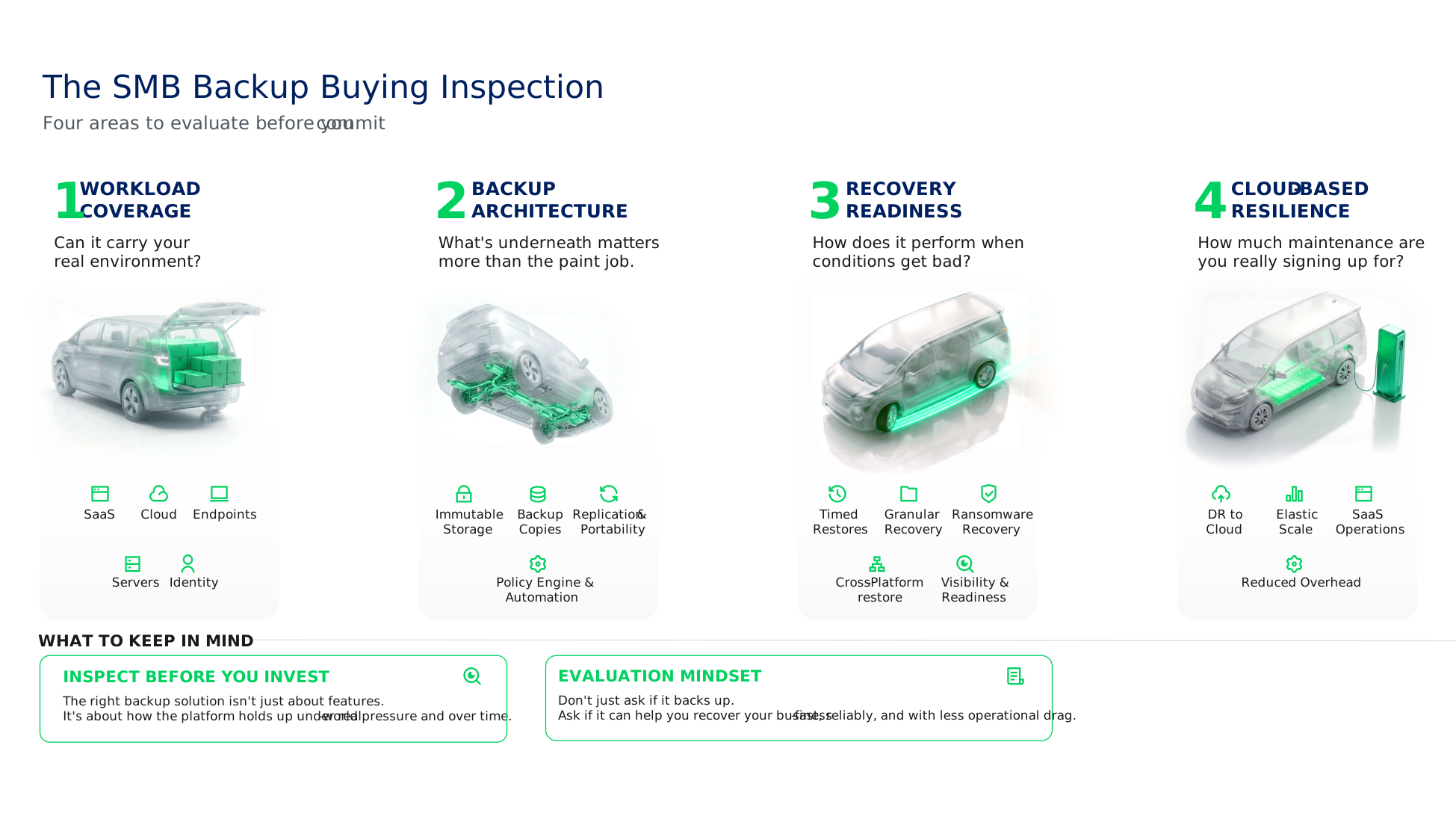
The better approach is evaluating whether the platform can support these four operational outcomes:
- Workload coverage
- Backup architecture
- Recovery readiness
- Cloud-based resilience
Those four areas reveal far more about long-term resilience than a generic feature checklist ever will.
1. Workload Coverage
The first question you should ask is not:
“How many workloads does this platform support?”
It’s:
“Can this platform protect the systems my business actually depends on together?”
That distinction matters.
Most SMB environments now span a mix of:
- On-premises infrastructure
- Virtual machines (VMs)
- SaaS applications
- Cloud workloads
- Identity systems
- Endpoints
- DevOps and modern application environments
Coverage is not just about what gets backed up; it’s about what can come back together during recovery.
Identity, applications, infrastructure, cloud services, and user-generated data often depend on each other to recover in the right sequence. That is why fragmented protection strategies tend to create operational friction later, especially during larger outages or cyber incidents.
A good recovery strategy is less about isolated backups and more about coordinated recovery across connected systems.
During evaluation, ask vendors:
- What workloads are protected natively?
- What requires another product?
- What is not covered at all?
- How is visibility handled across environments?
- How are dependencies managed during recovery?
These questions are important to ask because operational complexity usually grows fastest in the seams between disconnected tools.
2. Backup Architecture
The second evaluation area is understanding how the platform actually creates resilience.
Not all backup methods are designed for the same recovery outcome.
Snapshots, replicas, native retention features, and independent backups all behave differently during recovery. Some are optimized for convenience and short-term rollback, and others are designed for resilient, portable recovery across environments. Snapshots help teams operate quickly, and independent backups help teams recover flexibly.
That distinction becomes extremely important when recovery expectations, ransomware resilience, portability, and business continuity enter the conversation.
During evaluation, SMBs should look closely at whether the protection approach aligns to business recovery expectations. This includes understanding how recovery objectives are handled, whether immutable recovery points are available, how backup data behaves as infrastructure changes over time, and whether policy-driven automation reduces operational overhead instead of adding more management complexity.
A platform may create backups successfully while still creating operational risk later if the underlying architecture becomes rigid, fragmented, difficult to scale, or overly dependent on manual intervention.
3. Recovery Readiness
Recovery is the real test.
The hardest recovery problems rarely happen inside a single workload. They happen in the seams between systems, dependencies, identities, timelines, and operational assumptions.
That is why SMBs should evaluate recovery workflows as aggressively as they evaluate backup creation.
| Recovery Area | What SMBs Should Validate |
| Timed restore performance | Whether recovery aligns to actual RTO expectations under pressure. |
| Granular recovery | Whether common restores like files, emails, records, or application objects are low friction. |
| Ransomware recovery | How clean recovery points are identified and validated before restore. |
| Cross-platform recovery | Whether workloads can be recovered to alternate infrastructure or cloud environments. |
| Recovery visibility | Whether teams can quickly identify failed jobs, protection gaps, and recovery readiness. |
| Operational usability | Whether restore workflows stay manageable for lean IT teams during real incidents. |
A fast backup job does not automatically guarantee fast recovery, coordinated recovery, or trusted recovery during a real disruption.
This is also where many products reveal the difference between technical capability and operational usability.
A restore workflow may technically work while still being too manual, inconsistent, or fragile for a lean IT team to execute confidently during a real incident.
4. Cloud-Based Resilience
For many SMBs, cloud-based resilience is not just about recovery location, it’s about operational simplification too.
Traditional recovery models often require:
- Secondary infrastructure
- Manual provisioning
- Patching and maintenance
- Complex DR orchestration
- Additional operational overhead
Cloud-based resilience changes that equation.
During evaluation, SMBs should look at:
- Off-site immutable backup options
- Recovery into cloud infrastructure
- DR orchestration
- SaaS-delivered backup operations
- Elasticity during recovery events
- How much infrastructure the team still has to manage directly
For lean IT teams especially, turnkey operational models can dramatically reduce the Day 2 burden associated with backup infrastructure management.
That operational shift matters more than many evaluations account for.
This is because the real goal is not just to move backups into the cloud. It’s to reduce the amount of infrastructure, maintenance, and operational babysitting required to stay resilient long term.
What Veeam Offers SMBs
Veeam gives SMBs two clear paths depending on how much they want to manage themselves. Veeam Data Platform Essentials is the self-managed option for small businesses that need backup and recovery across hybrid, on-premises, physical, virtual, and cloud environments. It’s positioned for smaller IT teams that want broad workload coverage and monitoring without having to move to a fully managed service.
For organizations that want less infrastructure to run themselves, Veeam Data Cloud is the fully managed SaaS option. It delivers backup as a service for cloud workloads including Microsoft 365, Microsoft Entra ID, Azure, and Salesforce, with Veeam handling the backup software, infrastructure, and storage as part of the service model.
For SMBs that want enterprise-grade capability with lower deployment overhead, Veeam Software Appliance adds another practical option. Veeam positions it as the recommended way to deploy Veeam Data Platform: A turnkey, Linux-based appliance that is hardened by default and designed to simplify deployment, configuration, and ongoing maintenance.
FAQs
1. How should a SMB evaluate backup software?
A small business should evaluate backup software based on recoverability, coverage, and Day 2 usability, not just price or feature lists. The key question is whether the product can restore critical data quickly and reliably without creating too much manual work for the IT team.
2. Are OneDrive or Dropbox the same as backup?
No, sync and storage tools are not the same as backup. Sync platforms keep files consistent across devices, which means deletions, overwrites, and some ransomware-related changes can also propagate. Backup is designed to preserve independent recovery points for restore.
3. What is the most important test before buying backup software?
The most important test is a timed restore, not a backup demo. A vendor should be willing to restore a real workload during a trial or proof of concept, so you can compare actual recovery time against your business requirements.
4. What backup capabilities matter most for SMBs?
The most important capabilities for SMBs are broad workload coverage, automated discovery and policy assignment, backup verification, immutable storage, granular restore, flexible recovery options, and clear monitoring/reporting. Those are the features that most directly affect resilience and day-to-day manageability.
5. What should a backup vendor demonstrate during proof of concept?
A backup vendor should demonstrate a live restore, alerting after a failed backup, ransomware recovery workflow, granular restore for a key workload, and pricing behavior as the environment grows. If they cannot prove those during evaluation, buyers should treat that as a warning sign.
The post Small Business Backup Software: A Practical Evaluation Guide appeared first on Veeam Software Official Blog.
from Veeam Software Official Blog https://ift.tt/19gryL7
Share this content: