

Key takeaways
- Microsoft 365 Copilot does not have permissions of its own. It retrieves content through Microsoft Graph on the user’s behalf, so any file a user can open, including files shared too broadly in the past, can appear in a Copilot answer.
- AI agents are a category of non-human identity that most inventories do not cover. They act with the permissions of the person using them or the person who built them, and they do not appear in the user lists, group reports, or access reviews IT relies on.
- Veeam Intelligent ResOps for Microsoft 365 (iResOps) discovers AI agents, shows which files each identity can reach and whether that access is used, and applies Microsoft Purview sensitivity labels. A label restricts Copilot when it is configured with encryption.
- When an agent makes a mistake, Undo AI uses the file-level activity record in Veeam Intelligent ResOps to identify every file the agent changed, and Veeam Data Cloud for Microsoft 365 restores only those files, leaving everyone else’s work in place.
Consider a hypothetical company that is preparing to deploy Microsoft 365 Copilot and AI agents to all of its employees. Before the deployment goes ahead, the company’s CIO asks IT a single question: what data will our agents be able to access? The answer depends entirely on existing permissions, because Copilot does not have permissions of its own. When a user submits a prompt, Copilot retrieves content through Microsoft Graph on that user’s behalf. Any file the user has permission to open, Copilot can read, summarize, and quote in its response. This includes files that were shared too broadly in the past and never reviewed again.
What happens when a Microsoft 365 Copilot rollout surfaces oversharing
At this company, a marketing director is preparing for a quarterly planning meeting. She asks Copilot to summarize the company’s Q3 priorities and expects a short list of product and campaign goals. The summary she receives also names three companies that the business is evaluating for acquisition. She has no role in that process, and she has never seen this information before. She opens the source that Copilot cited and finds a Finance planning workbook. One tab lists the quarterly priorities, and the next tab lists the acquisition targets. She did not search for this file, and nobody shared it with her directly. Even so, she can open it and read every tab. She realizes that if she can open the workbook, so can everyone else in the company, and she reports it to IT.
IT traces the access to a single sharing setting. During a previous budget cycle, Finance shared the site with “Everyone except external users” so that every department could enter its figures. Nobody removed that setting after the budget cycle ended. Copilot returned the workbook because the director’s permissions already included it.
Copilot did not create this exposure. The exposure already existed in the permissions; Copilot made it easily visible. In a vacuum, this is a single, easily fixable permissions problem. But in reality, IT does not know how many other files are shared the same way, or which AI agents can already reach them. The director found this workbook only because she happened to ask a related question. Other employees may have received similar results and never reported them — nobody can say how many. As a result, one report becomes a tenant-wide investigation. IT now has to find every other site, file, and link that is shared too broadly, and identify which people and agents can reach each one. IT cannot approve the full rollout until that investigation answers the CIO’s question with evidence, rather than waiting for the next employee to report a surprise. Until then, the deployment stays on hold, and the Copilot licenses the company has already purchased go unused.
The CIO may assume that IT already has this evidence. Survey data suggests that IT is far less certain. In Veeam’s Data & AI Trust Gap Report 2026, a survey of 600 senior executives, 65% of CEOs said they believe they have a full inventory of the AI in use across their organization, compared with 48% of technical leaders. The people approving AI rollouts are more confident in that inventory than the people who would have to produce it and secure what is on it.
Why Copilot and AI agents are hard to govern in Microsoft 365
AI agents are hard to see. IT already struggles to keep an accurate picture of human identities: new hires, role changes, departures, and the group memberships that accumulate along the way. Agents add a category of non-human identity that most inventories do not cover. Business users can build agents in tools such as Copilot Studio or switch on prebuilt ones, and those agents act either with the permissions of the person using them or with credentials supplied by the person who built them. Agents do not appear in the user lists, group reports, or access reviews IT relies on, so an agent can work with a department’s files for months without showing up anywhere IT looks.
Copilot inherits every sharing decision ever made. Most Microsoft 365 tenants carry years of broad sharing: sites opened to “Everyone except external users,” “People in your organization” links, and groups granted access for projects that ended long ago. Before Copilot, those settings caused little harm, because reaching an overshared file meant knowing it existed and where to find it. Copilot searches across everything a user can access, so a site shared tenant-wide in 2021 for a single vendor engagement becomes source material for answers in 2026. Many organizations respond by pausing the rollout, which leaves paid Copilot seats unused while IT tries to audit permissions it has never had a complete view of.
Agent mistakes are expensive to reverse. Many agents do more than read; they can create, edit, move, and delete files. When an agent misapplies its instructions and deletes or overwrites production data, the first question is which files it touched, and nobody has that list. The agent’s own output may be incomplete or wrong. The Microsoft 365 audit log records file operations, but turning it into a reliable list means exporting events, filtering them by the right identity and time window, and reconciling the results by hand. Item-level restore exists, but it only helps if you know which items to select. Without that list, the practical fallback is to restore the entire site to a point in time before the agent ran. That reverses the agent’s changes, but it also discards every legitimate change anyone else made to the site since the restore point: edits, new files, and intentional deletions.
A separate post in this series covers the Copilot permissions problem in depth. This post covers how to fix it.
How Veeam Intelligent ResOps gets Microsoft 365 ready for Copilot: discover, govern, undo
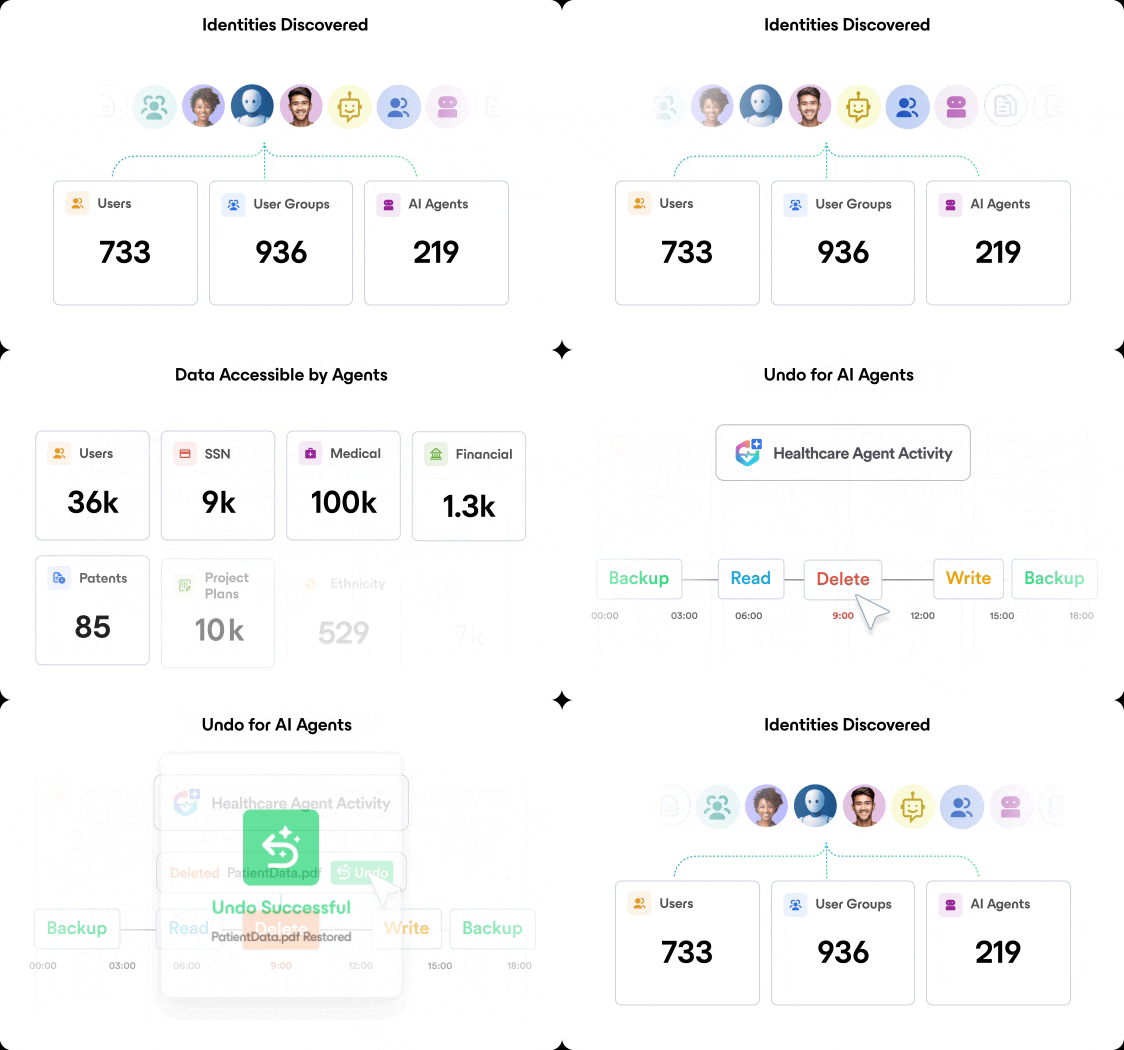
Veeam Intelligent ResOps for Microsoft 365 (iResOps) is an add-on to Veeam Data Cloud for Microsoft 365. It adds three things to the backup you already run: an inventory of which people and agents can reach each file, a file-level record of what each of them has done, and controls to label sensitive data and reverse unwanted changes. Pairing that record with the backup is what makes it possible to reverse an agent’s changes to specific files rather than to a whole site. For an AI rollout, the work happens in three steps.
Discover: find AI agents and the data they can reach
The first step is an inventory. iResOps finds the AI agents operating in your Microsoft 365 environment and lists them in the same view as your users and groups, so non-human identities get reviewed with the same scrutiny as human ones. It then shows, for each identity, which data it can reach and at what permission level, such as view-only or edit. This matters because an agent’s access is usually borrowed from a person. At the hypothetical company, for example, the head of Finance built an agent to answer routine expense questions. Because she created the agent, it acts with her credentials. It can therefore open every file she can, including the planning workbook that lists the acquisition targets. None of those files has anything to do with expense questions. iResOps shows the agent, the permissions it inherited, and the specific files those permissions cover. Both capabilities are in the Foundation edition, so you get the access map without first running data classification, which is an Advanced edition capability.
Govern: remove unneeded access and label sensitive data
Once you can see the access, two mechanisms reduce it.
The first is removing access nobody needs. iResOps surfaces oversharing at the file level. For a given agent or group, it shows the specific files that identity can open, the sharing setting or link that grants that access, and, from its record of file activity, whether anyone has actually used it. That last detail is what makes cleanup safe. Access that was granted but has never been exercised can usually be removed without disrupting anyone, while access that is used regularly signals that the share supports real work. In the opening scenario, this comparison would show that Finance staff open the planning workbook every week, while employees in other departments have not opened it since the budget cycle ended. IT can then remove company-wide access to the Finance site, and the Finance staff who rely on it keep working. iResOps recommends the change; your admin makes it, so no permission is altered without a person approving it.
The second is labeling what is sensitive. Data Labeling applies Microsoft Purview sensitivity labels (formerly Microsoft Information Protection, or MIP) through your existing integration, using the label taxonomy your organization has already defined. Labels restrict Copilot when they are configured with encryption. An encrypted label defines who may use the content and how, and Copilot will only use a labeled file in its answer if the person asking holds the required usage rights (VIEW and EXTRACT). A label that only marks a file, for example with a header or watermark, does not restrict Copilot. In the opening scenario, an encrypted label on the Finance planning workbook would restrict its use to the Finance staff who hold the required rights. Copilot would then leave the acquisition targets out of the marketing director’s summary, even if the old sharing setting still gave her access to the site. Finding sensitive data (Sensitive Data Discovery & Classification) and labeling it are Advanced edition capabilities.
Undo: reverse an agent’s changes file by file
iResOps records what each agent does at the file level: every read, write, and delete, per file, including activity that runs through Copilot. iResOps produces that record, not the agent, so it remains reliable when the agent’s own log is incomplete, wrong, or missing, which is exactly the situation after an agent malfunctions. When an agent makes a mistake, Undo AI uses the record to identify every file the agent changed, and Veeam Data Cloud for Microsoft 365 restores only those files to their backed-up versions from before the agent ran.
Later in the rollout, the same company runs into a different kind of problem. A project manager builds an agent to clean up her team’s project site. She tells it to delete any file that has “draft” in its name and has not been edited in six months. The team’s signed contracts were created from a template named “Contract draft,” and nobody renamed them after signing. The agent follows its instructions exactly and deletes the signed contracts along with the actual drafts. The next morning, the legal team cannot find the contracts and reports the problem to IT. IT opens the activity record for the agent. The record lists the 312 files the agent touched and the action it took on each one. IT selects those 312 files and restores them from the backup. The other 40,000 files on the site stay as they are, and so does every change that other people made that day. A site-level rollback would also have recovered the contracts. However, it would have erased everyone else’s work since the restore point.
The query to run first
“Which AI agents can reach files containing regulated data, and what have they changed this month?”
That one question uses all three steps: discovery (which agents exist), access (what they can reach), and activity (what they changed). Saved as a policy in iResOps, it stays in place after the first review and flags the next agent that gains access to regulated data, so the answer does not go stale the day after you produce it. One dependency to note: identifying which files contain regulated data relies on Sensitive Data Discovery & Classification, which is in the Advanced edition.
What makes Veeam Intelligent ResOps different for AI readiness
Data security, identity, and backup tools each typically cover one part of this problem. Data security tools show where sensitive data sits, identity tools show who holds which permissions, and backup tools recover data after something goes wrong. Connecting those views during an incident is manual work. iResOps puts three things in one place: the sensitive data, every identity that can reach it, human or agent, and whether that data can be recovered.
The detail is at the file level, not the site or group level. You see which specific files an agent can reach and which it actually touched. That precision is what lets you remove a risky permission without cutting off the people who depend on it, and reverse an agent’s changes without rolling back anyone else’s.
Recovery is part of the answer. Other approaches stop at controlling what AI can reach. That reduces future risk but does nothing about a change an agent has already made. Veeam adds the ability to undo what the agent did, through the backup you already run. The table below compares the two ways to recover from an agent mistake.
| Point-in-time rollback | Undo AI | |
| What gets restored | the whole site or tenant, to one point in time |
only the files the agent changed |
| What else moves | every other user’s changes since that point | nothing |
| Where the list of affected files comes from | the native audit log, exported and filtered by hand | the file-level activity record in iResOps |
The outcome: a Copilot rollout with a ship date
AI is only as safe as the data it can reach. With iResOps in place, IT can answer the CIO with specifics instead of reassurance: this is what Copilot and the agents can reach, this is what they cannot, and this is how we reverse it if one of them gets something wrong. Few organizations can give that answer today. In the Trust Gap report, only 40% of leaders were very confident they could isolate and reverse an agentic AI failure. Being able to do both is what turns an open-ended pilot into a rollout with a ship date, and puts the idle Copilot licenses to work.
Veeam Intelligent ResOps editions and where to start
iResOps is an add-on to Veeam Data Cloud for Microsoft 365 and comes in two editions. Foundation covers visibility and recovery: discovery of AI agents and users, a view of the data each one can reach, a file-level record of what each one does, saved policies that flag new exposure, and Undo AI. Advanced includes all of those and adds Sensitive Data Discovery & Classification and Data Labeling, which you need to find regulated data and protect it with sensitivity labels. A practical place to start is the query above. Its answer is the list of agents and files your rollout has to address first.
Request a demo of Veeam Intelligent ResOps for Microsoft 365, or read more on the product page.
FAQs
Microsoft 365 Copilot can access any file the user who submits the prompt has permission to open. Copilot does not have permissions of its own: it retrieves content through Microsoft Graph on that user’s behalf, and it can read, summarize, and quote those files in its response. This includes files that were shared too broadly in the past and never reviewed again, such as sites opened to “Everyone except external users” and “People in your organization” links.
Veeam Intelligent ResOps for Microsoft 365 finds the AI agents operating in your Microsoft 365 environment and lists them in the same view as your users and groups. For each identity, it shows which data it can reach and at what permission level, the sharing setting or link that grants that access, and whether anyone has actually used it. Discovery and the access view are in the Foundation edition, so you get the access map without first running data classification.
Undo AI is an iResOps capability that shows which files an AI agent read, modified, or deleted, and restores only the affected files to their state before the agent ran. The work is split between two products: iResOps supplies the file-level record of what the agent did, and Veeam Data Cloud for Microsoft 365 performs the restore from its backup. Everything else in the tenant, including other people’s work since the agent ran, is left untouched.
Yes. iResOps finds Copilot and the AI agents operating in your Microsoft 365 environment and lists them alongside your users and groups. It shows the data each one can access and at what permission level. It then records what each agent reads, writes, or deletes, file by file, so you can see both what an agent could do and what it has actually done.
No. Undo AI is scoped to the files an AI agent changed. iResOps lists the files the agent touched, you choose which changes to reverse, and Veeam Data Cloud for Microsoft 365 restores those files and nothing else. Full-site and tenant-level backup and restore remain the job of Veeam Data Cloud for Microsoft 365 for every other recovery scenario.
The post Get Microsoft 365 Ready for Copilot and AI Agents with Veeam Intelligent ResOps appeared first on Veeam Software Official Blog.
The post Get Microsoft 365 Ready for Copilot and AI Agents with Veeam Intelligent ResOps appeared first on Veeam Software Official Blog.