
Key Takeaways
- Demand a full API (application programming interface) and CLI (command-line interface), not GUI (graphical user interface)-only operation. Scripting job creation, policy changes, and reporting keeps a one- or two-person team from drowning as the environment grows.
- One compromised admin credential shouldn’t be able to delete your backups. The control that prevents this needs a second named approver, and an outside partner can fill that role.
- Storage cost is tunable before it becomes a purchase. Compression, deduplication, and tiering settings can extend retention on capacity you already own.
- AI troubleshooting only saves real time if it reads your actual job logs and repository data, not the product manual. Confirm which mode your tier includes.
If you run backups at a small company, you’re probably the only person who does. No security team to escalate to, no second admin to catch what the console doesn’t surface, and no budget for discovering mid-incident that a control you assumed you had sits two tiers up.
That makes feature evaluation harder than it looks. Ask any vendor whether their platform supports API access, immutability, or role-based permissions and the answer is yes. The useful questions are narrower:
- Which capabilities are included at the tier you can actually afford?
- Which ones need a product version you aren’t running?
- Which ones require a second person to function at all?
- Which ones switch each other off?
Our guide to small business backup software covers the broader evaluation process. This piece takes a narrower angle: seven features you should demand if you want operational control, meaning the ability to script, integrate, tune, and diagnose your own environment without filing a ticket. For each one, it also covers what to ask after the vendor says yes.
Backup Feature Comparison Table
Here are the seven features worth holding a vendor to. Read the third column as your demo script. Each question is phrased to produce a specific answer instead of a yes.
|
Feature |
What it means |
What to ask the vendor |
|
API and CLI access |
Job creation, policy changes, and reporting can be scripted instead of clicked through. |
What share of platform functionality is exposed through the API, and what stays GUI-only? |
|
Second-approval authorization |
Deleting backups or removing repositories requires a second, separate credential to approve. |
Which operations are gated, and can approval be delegated to an outside partner if I’m the only admin? |
|
Native SIEM and monitoring integration |
Backup alerts land in the monitoring stack you already watch, through syslog or webhooks. |
Which integration methods are native, and is external event forwarding included at the tier I’m pricing? |
|
Configurable storage efficiency controls |
You set compression level and deduplication behavior instead of accepting a vendor default. |
Which of these settings can I change myself, and which require a support request? |
|
Automatic tiered storage offload |
Aging backups move from fast local storage to lower-cost object storage on a policy you set. |
How are the schedule and threshold configured, what happens if a transfer is interrupted, and do offloaded copies stay immutable? |
|
Environment-aware AI assistant |
Answers draw on your real job history, alarms, and capacity data, not generic documentation. |
Does the assistant read this environment’s data, and which mode and product version does that require? |
|
Automated fix suggestions |
The platform proposes a specific resolution when a job fails instead of returning an error code. |
Can you show a suggested fix on a simulated failure during the demo, and what approval step runs before anything executes? |
Access for Backup Automation
A platform with real automation coverage lets you drive it from a script or a terminal, not just pull status out of it. Look for the ability to:
- Create and modify backup jobs
- Change retention and policy settings
- Add or remove protected workloads
- Pull job and capacity reports
- Trigger restores
- Deploy and update agents
If the only way to protect 12 new machines is to click through a wizard 12 times, the platform is costing you hours that never appear on an invoice. A script that provisions a job from a template runs the same whether you’re adding three servers or 30.
A full API is not the same as a handful of read-only endpoints, and plenty of platforms advertise REST API support while delivering something that reports job status but can’t create a job. Veeam Backup & Replication exposes both a REST API and PowerShell cmdlets, and you can read how the RESTful approach works in practice.
Ask the vendor: send me the public API reference before the next call. Versioned documentation you can read without a sales contact is the real signal. A PDF on request is not.
Second-Approval Authorization for Destructive Actions
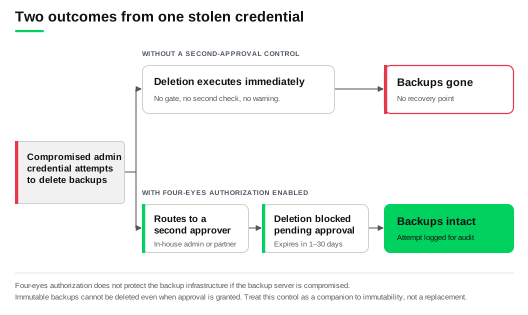
Second-approval authorization, often called four-eyes authorization, requires a second set of credentials to approve high-risk operations. In Veeam Backup & Replication, the gated operations are:
- Deleting backup files, snapshots, or records of unavailable backups from disk or the configuration database
- Removing backup repositories, storage, and service providers from the infrastructure
- Adding, updating, or deleting users and user groups
- Enabling, disabling, or resetting multi-factor authentication
Requests sit in a pending approvals queue until a second administrator approves or rejects them, and every approval, rejection, and configuration change lands in an audit log.
For a solo admin, this control decides whether a stolen credential is an incident or a catastrophe. Ransomware operators go for backups first, and one compromised login with full administrative rights can clear a repository in minutes.
Three things to know before you assume you can switch it on.
It needs a second named person. The feature requires at least two users holding the Veeam Backup Administrator or Veeam Security Administrator role. Enable it with only one and you get an error. If you’re genuinely the only admin, an MSP, VAR, or trusted contractor is what makes this doable. No partner, no control.
It blocks scripted deletion entirely. With four-eyes authorization on, delete operations through PowerShell, the REST API, and Veeam Backup Enterprise Manager aren’t gated, they’re unavailable. If you’ve automated cleanup, that automation stops. Most small teams should accept the trade, since scripted deletion is the path an attacker with your credentials would take, but decide it deliberately.
It doesn’t cover a compromised server. Four-eyes authorization protects actions taken through the platform. It can’t protect the backup infrastructure if the Veeam Backup & Replication server itself is compromised, and it can’t touch immutable backups, which stay undeletable even with approval granted. Treat it as a companion to immutability, not a substitute. Veeam’s security best practices cover how the layers fit together.
Ask the vendor: with no second in-house admin, how does a partner get set up as approver, and what happens to a pending request that nobody acts on?
Native SIEM and Monitoring Integration
Native integration means the platform pushes backup events outward on its own, so failures and security events land in whatever you already watch. In Veeam Backup & Replication this runs through Event Forwarding, using the RFC 5424 syslog format over UDP, TCP, or TLS, with prebuilt apps for Splunk and Microsoft Sentinel on the receiving end.
A dedicated backup dashboard only works if someone checks it daily, and when you’re also handling the helpdesk queue and the firewall, a separate pane of glass becomes a pane nobody looks at. A backup job that failed quietly for nine days is a restore you don’t have. Our guide to security information and event management covers the receiving side.
Now the part vendors gloss over, including us. In-product monitoring and external event forwarding are different capabilities at different tiers, and they get conflated in demos.
|
Capability |
Foundation Edition (incl. Essentials bundle) |
Advanced and Premium Editions |
|
In-product monitoring, alarms, and reporting |
Included via Veeam ONE |
Included via Veeam ONE |
|
Syslog event forwarding to an external SIEM |
Not included |
Included |
Plenty of small teams genuinely need the first and not the second. Decide which one you’re buying, because the gap surfaces after the purchase order clears.
Ask the vendor: put the tier for each integration method on the quote itself, not in a feature matrix on a web page.
Configurable Storage Efficiency Controls
Direct control over storage efficiency means you set compression level and deduplication behavior on a job or repository yourself, rather than accepting whatever ratio the vendor decided was reasonable. It’s the difference between a retention policy you designed and one your storage capacity designed for you.
The trade-off runs three ways, and vendors tend to mention only the first:
|
Turning compression up |
Effect |
|
Storage consumed |
Goes down |
|
Backup processing time |
Goes up |
|
Restore speed |
Goes down |
That third row should drive your decision. Storage is a problem you notice monthly on a capacity report. Restore speed is a problem you notice on the single worst day of your year, with someone standing behind you asking how long. Tune for the day you need the data, not the day you review the invoice.
On a fixed storage budget, these settings are what buy you flexibility without spending. If you’re at 80% on the repository and the ask is three more months of retention, adjustable compression and deduplication may get you there on hardware you already own. That’s a settings dialog instead of a purchase order.
Ask the vendor: which of these settings require a support request to change? A platform that gates compression behind a ticket will gate other things too.
Automatic Tiered Storage Offload
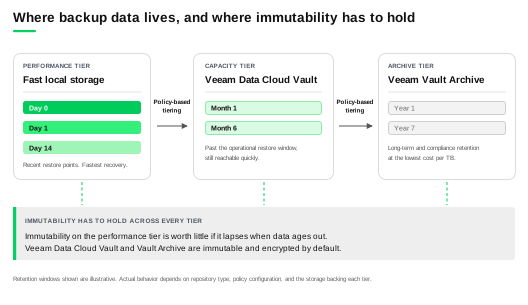
Tiered offload moves aging backup data from fast local storage to lower-cost object storage automatically, on a policy you define. In Veeam Backup & Replication this is the scale-out backup repository, which has three tiers: a performance tier for recent restore points, a capacity tier for older backups still inside the recovery window, and an archive tier for long-term retention, with data aging across the boundaries on schedule.
Retention stops competing with performance. Recent backups stay on the storage that restores fastest, and older data moves somewhere cheaper where slower retrieval is an acceptable trade. The word doing the work is automatically: manual lifecycle management gets deferred a quarter, and then the repository fills on a Friday.
Three questions worth asking, because the failure modes matter more than the capability:
- How are the schedule and threshold configured? Age-based, capacity-based, or both, and can you change it later?
- What happens if a transfer is interrupted? A half-migrated restore point is one you can’t trust. Ask what happens when the link to object storage drops mid-offload.
- Do the offloaded copies stay immutable? Immutability on the performance tier is worth much less if it lapses when data ages out. This is the question most likely to expose a gap.
Our post on native cloud object storage covers how the tiering works in more depth.
Veeam’s own answer here is Veeam Data Cloud Vault Archive. Vault attaches as the capacity tier for backups still inside the recovery window, Vault Archive as the archive tier for data that has aged past it, with policy-based tiering moving restore points down automatically. Both are immutable and encrypted by default, which answers the third question above instead of leaving it to configuration.. Vault attaches as the capacity tier for backups still inside the recovery window, Vault Archive as the archive tier for data that has aged past it, with policy-based tiering moving restore points down automatically. Both are immutable and encrypted by default, which answers the third question above instead of leaving it to configuration.
Ask the vendor: show me the offload policy screen during the demo, and what a failed offload looks like in the alert log.
AI Assistant with Live Environment Access
There are two very different things being sold as an AI assistant in backup software, and the difference determines whether it saves you time or wastes it.
|
|
Documentation-grounded |
Environment-aware |
|
What it reads |
Product docs, KB articles, forums |
Your actual job history, alarms, and configuration |
|
Sample answer |
“Here’s how retention works and where to configure it” |
“This job failed three times this week on the same volume, here’s the repository state” |
|
Useful for |
Learning the product |
Diagnosing your environment |
The first is a better search box. Useful when you’re new to a platform, but it isn’t troubleshooting: ask why last night’s job failed and you’ll get an explanation of job failures in general, then still have to read the logs. The environment-aware version is where time actually comes back, because an assistant that already knows which jobs ran, what repository utilization looks like, and which alarms fired removes the gathering step, which is most of the work.
Ask the vendor: which mode is available at the tier and version I’m buying, and show me an environment-aware answer on a real environment during the demo, not a scripted example.
Automated Fix Suggestions for Backup Issues
The previous section asked whether the assistant could see your environment. Here we ask whether it can act on what it sees, and what stops it acting wrongly.
A useful fix suggestion names a specific cause and a specific next step. “Job failed, error code 0x80070005” is homework. “The guest processing credential no longer has local admin rights on two of the four VMs” tells you where to go.
Veeam Intelligence has an opt-in Experienced Backup Admin agent that works this way. It reads actual job and session logs and investigates in real time rather than pattern-matching an error code, it can query your existing Veeam support cases and open a new one with the logs attached, and it reports storage consumption per repository and per workload with growth trends. It requires a current product version, so treat it as a version question. Veeam’s AI-driven data recovery insights page covers the broader capability set.
Here’s the part to interrogate. An assistant that suggests fixes is low risk. An assistant that executes them is a different proposition, and platforms are moving that way: Veeam Intelligence can now retry jobs, rescan repositories, switch a scale-out backup repository into sealed mode, trigger malware scans, and run recoveries. That’s real convenience and a real blast radius.
What makes it acceptable is the gate: before a risky action runs, it shows what it intends to do, waits for your approval, and logs the approval. Demand that pattern from any vendor, because automation without a preview step and an audit trail just relocates your troubleshooting problem into an incident-review problem.
Ask the vendor: which actions can it execute without asking me first, and where does the audit record land?
Veeam’s Approach for SMB IT Admins
Veeam Data Platform covers all seven of these, and the right edition depends on which capabilities you need rather than on your company size. Every edition gives you the same console, REST API, PowerShell cmdlets, and tuning controls. What differs is what sits around them, including the external event forwarding covered above. Price the capability, not the label. Our small business solutions page covers where teams usually start.
Backup software is only half the cost conversation. Where the data lands is the other half, and that’s what Veeam Cloud Storage Solutions cover: Veeam Data Cloud Vault for recovery-critical backups, Veeam Data Cloud Vault Archive for data past its recovery window. Both are fully managed, immutable, encrypted, and logically air-gapped, with egress and API fees folded into a flat per-TB price, which matters more to a small team than a headline rate you have to model yourself.
If you’d rather hand off whole workloads, Veeam Data Cloud runs them for you: Microsoft 365, Microsoft Entra ID, Microsoft Azure, and Salesforce.
One honest note, consistent with the SIEM section above. External syslog forwarding sits at the Advanced and Premium editions. If that’s a hard requirement, price it deliberately rather than assuming it’s in the edition you were quoted. Apply the same scrutiny to us that this article recommends applying to anyone.
Whichever edition or service you land on, the seven questions in the comparison table are the ones worth asking. For next steps, our guide to cloud backup services for SMBs covers best practices for the hosted side, and The SMB Guide to Protecting Business Data is the deeper reference.
FAQs
Yes, and arguably more than for a large one. A full API lets you script job creation, policy changes, and reporting, which absorbs growth without adding headcount. A team of one or two feels that more sharply than a team of 10, because there’s no slack to absorb manual work.
Granular RBAC lets you delegate routine work without handing over destructive power. A junior staff member can be given rights to restore a single file or mailbox item while having no ability to delete backups, change retention, or modify infrastructure. That turns restore requests into something you don’t handle personally.
Because a separate dashboard only works if someone checks it. When alerts live in their own console, a stretched team may go days without opening it, and a job failing quietly is a restore you don’t have. Routing alerts into the stack you already watch surfaces failures where your attention is.
Often, yes. Adjustable compression and deduplication settings let you tune storage consumption against capacity you already own, and tiered offload moves aging data to lower-cost storage automatically. Veeam’s cloud storage solutions are built for that second half, with flat per-TB pricing that includes egress. Together these can extend retention without a hardware purchase, though higher compression can slow restores.
A specific, actionable root cause rather than a generic error code. “Guest processing failed because the credential lacks local admin rights on two VMs” tells you where to go. A hexadecimal error code tells you to start searching.
The post Backup Features Small Business IT Admins Should Demand appeared first on Veeam Software Official Blog.
from Veeam Software Official Blog https://ift.tt/DcP8esg
Share this content: