
Key takeaways:
- Shadow AI is a visibility problem before it’s a policy problem. You can’t govern tools you can’t see, and you can’t recover data you didn’t know was exposed.
- Tools built for shadow IT (CASB, DLP) miss most shadow AI, because AI often leaves no install footprint and hides inside platforms you’ve already approved.
- Reliable detection runs on three signal layers: Network and proxy logs, identity, access signals, and data classification.
- Governance is a continuous five-step loop, not a one-time audit: Inventory, classify, define acceptable use, enforce, and monitor.
- Recovery is the layer most frameworks skip. When an incident gets through, surgical file-level restore beats a full-snapshot rollback.
By the time a security team sits down to write its shadow AI policy, the problem is already months old. Dozens of unsanctioned AI tools are usually in use across the organization, and most of them are invisible to IT. The people using them aren’t being reckless. They’re trying to hit deadlines, and the approved path is slower than the browser tab that’s already open in front of them.
That’s what makes shadow AI hard. It isn’t really a policy problem, it’s a visibility problem. You can’t govern what you can’t see, and you can’t recover from data you didn’t know was exposed. A policy that bans “unauthorized AI tools” does nothing if no one can tell you which tools are running, what data they’ve touched, or whether that data is recoverable when something goes wrong.
This guide covers how to detect shadow AI across your environment, how to build a governance framework that actually holds, and how to prepare for the incident that gets through anyway.
What is shadow AI?
Shadow AI is the use of AI tools, apps, or models inside an organization without IT or security approval. It’s the next chapter of shadow IT: Instead of unsanctioned SaaS apps, employees now reach for unvetted AI assistants, copilots, and model APIs to work faster. The risk isn’t the tool; it’s the data. Every prompt, upload, or pasted document can carry confidential or regulated information to an endpoint no one is watching, which quietly expands your attack surface and your exposure.
Why Standard Detection Methods Miss Most Shadow AI
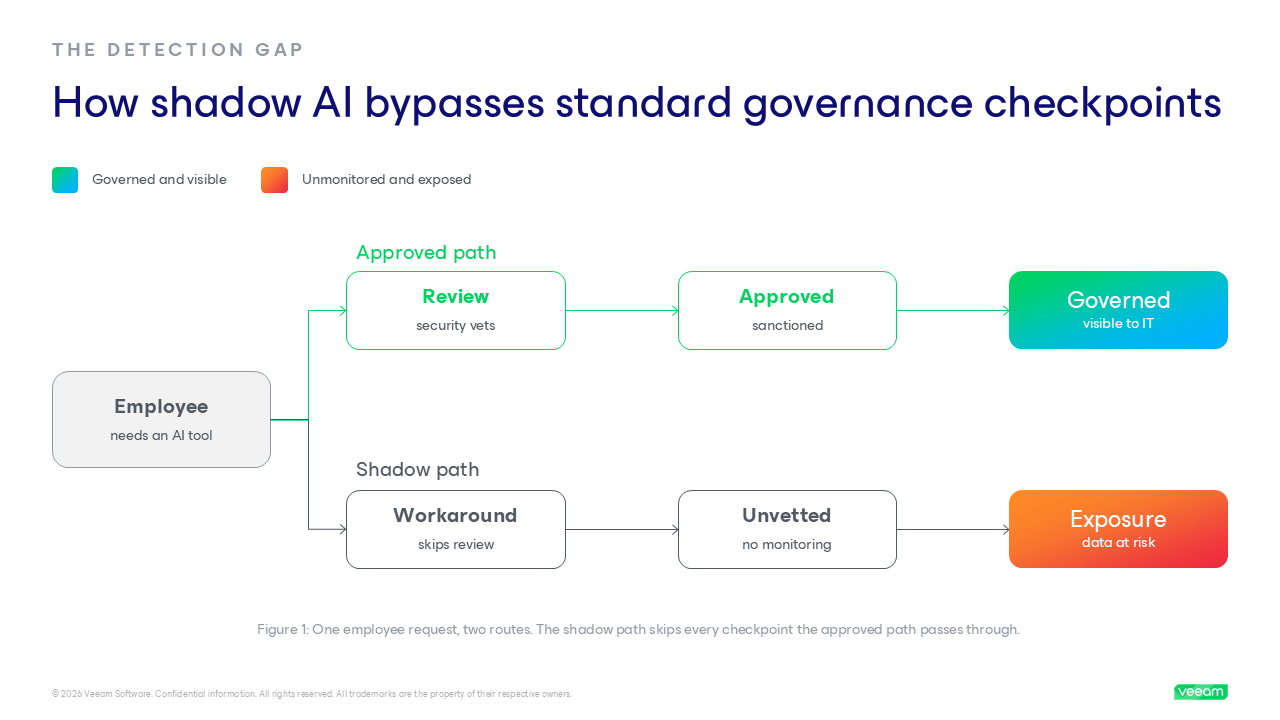
Most security teams already run tools that are supposed to catch unsanctioned software. They miss shadow AI anyway, because those tools were built to find shadow IT, and shadow AI doesn’t behave like shadow IT.
Shadow IT left a trail. An unapproved SaaS app usually meant a procurement record, a software install, a browser extension, or a recognizable network signature your CASB could match against. Shadow AI often leaves none of that. An employee opens a tab, signs in with a personal account, and pastes in a contract. There’s nothing to install and nothing to expense.
Shadow AI tends to hide in three places:
- Browser-based access with no endpoint footprint: The tool runs entirely in a tab. No agent, no install, nothing for endpoint monitoring to flag.
- AI features inside platforms you’ve already approved: Microsoft Copilot, Salesforce, and Notion AI build AI capabilities into tools already on your allowlist. The platform is sanctioned. The AI feature inside it usually wasn’t reviewed.
- Employee-expensed API usage: A developer or analyst puts a model API on a personal card and calls it directly. It never touches procurement, so it never appears in a vendor inventory.
So a CASB or DLP scan tuned for shadow IT returns an incomplete picture, because it hunts for installs, known domains, and procurement signals that AI usage doesn’t generate. Detecting shadow AI means reading different signals entirely, and the stakes are higher: AI is a fresh data-leakage channel layered on top of phishing, social engineering, and direct intrusion.
How to Detect Shadow AI Across Your Environment
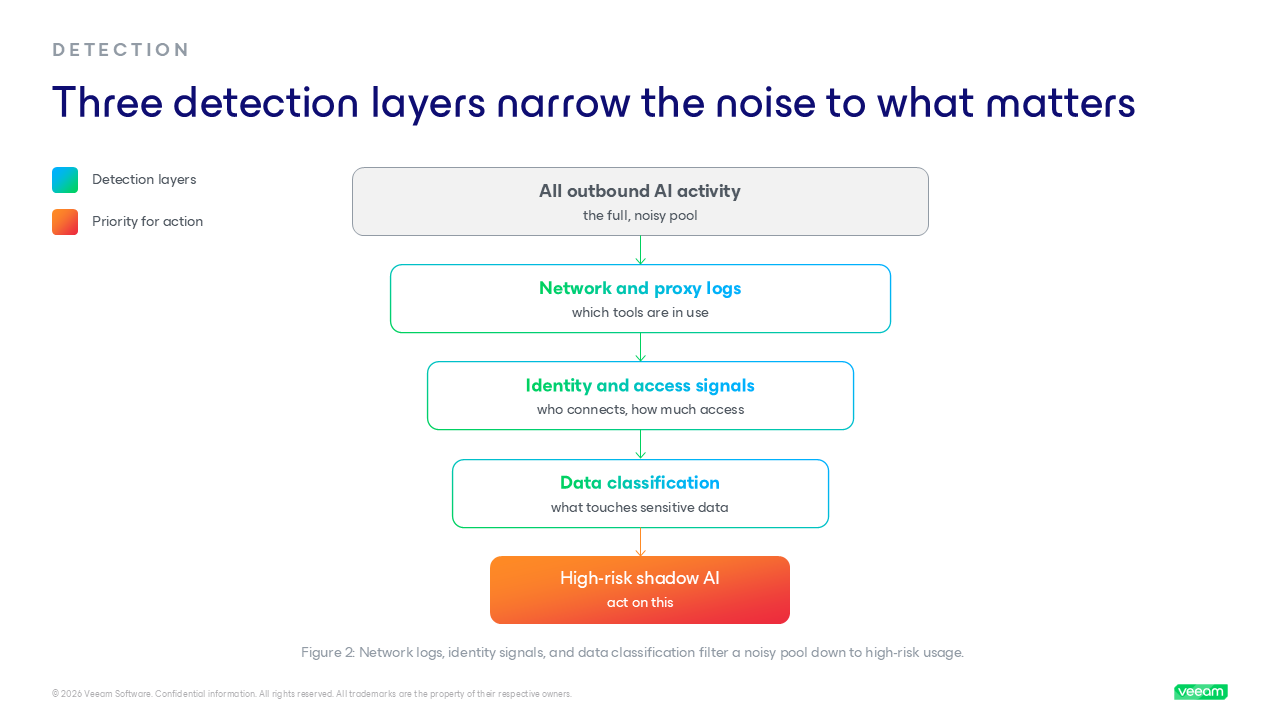
If you can’t buy your way to visibility with a single scanner, you find shadow AI by reading the traces it leaves behind. Three signal layers do most of the work: Network and proxy logs show where data is going, identity and access signals show who’s connecting to what, and data classification tells you which of it matters. Run them together and the picture sharpens fast. Run any one alone and you’ll see just a slice.
Network and Proxy Log Analysis
Start here because it’s the most reliable signal you already collect. Your firewall, proxy, and DNS logs record outbound traffic to AI provider endpoints, whether or not the tool was ever approved.
Look for traffic to the domains and API endpoints of the major providers (OpenAI, Anthropic, Google, Cohere, Mistral, and Hugging Face), then sort for the patterns that signal real usage rather than a passing visit:
- High-frequency API calls from a single host, which usually means an integration or script, not casual browsing.
- Large outbound POST payloads, the signature of data being uploaded into a prompt or fine-tuning job.
- Off-hours or automated traffic from accounts that have no business reason to call a model API.
The payoff is concrete: Pull the thread on a single suspicious log entry, and you can find an employee uploading a sensitive PDF to a public LLM endpoint from a personal identity. A CASB flags known AI domains, but only what’s on its list, so pair it with manual log review against an allowlist you maintain.
Identity and Access Signal Analysis
Network logs tell you a tool is in use. Identity signals tell you who’s using it and how much access they’ve handed over, and your identity provider and SSO logs catch what network monitoring misses.
Watch for OAuth grants to unapproved AI applications, authentications to AI tools using personal rather than corporate accounts, and service accounts showing AI-related API activity nobody can explain.
The pattern worth taking seriously is over-privilege. When an employee connects an AI tool to a cloud data store using broad, standing permissions (an AmazonS3FullAccess policy, for example, where a scoped, read-only role would do), they’ve quietly opened a path for that tool to reach far more data than the task ever required. Shadow AI plus over-privileged access is how a convenience tool becomes a breach.
More information on identity management: https://www.veeam.com/blog/identity-management-common-vulnerabilities-and-attacks.html
Data Classification as a Detection Anchor
The first two layers find tools. This one tells you whether to worry, because the question that matters isn’t which AI tools are running; it’s which ones are touching sensitive data. When you know where your sensitive and regulated data lives, you can map shadow AI usage against it and triage by real exposure: A tool summarizing public marketing copy is a footnote, while the same tool ingesting customer records is an incident waiting to happen. This is where the Veeam DataAI Command Platform does the heavy lifting. Its strength is AI discovery and data classification across SaaS apps, cloud platforms, databases, and production environments, so detection becomes risk-ranked instead of a flat list.
Building a Shadow AI Governance Framework
Detection tells you what’s already happening. Governance is how you stop it from happening again, and how you make the approved path the easy one. Treat it as a continuous loop, not a one-time audit, because the AI landscape shifts faster than any annual review can track.
If you want a recognized scaffold to map this against, the NIST AI Risk Management Framework is a solid reference point for managing AI risk across its lifecycle. The five steps below put that into practice:
Step 1: Build a complete AI tool inventory
You can’t secure what you can’t see, so visibility comes first. Create a living inventory of every AI tool in use, capturing how people access it, the data types it ingests, the vendor’s retention terms, and the team that owns it. This is a continuous record fed by the detection signals above, not a spreadsheet you fill once and forget.
Step 2: Classify data before enforcing policy
Policy without classification is enforcement theater. A rule banning “customer PII in AI tools” means nothing if people can’t tell which data counts as PII. Classify your data by sensitivity (public, internal, confidential, and regulated) and know where each category lives, so your acceptable-use rules can be specific: This category is fine in approved tools and that one never leaves the building. This is the step most frameworks skip, and the one that makes every later step work.
Step 3: Define and communicate acceptable use
Now you can write a policy that holds, because it rests on a real inventory and classification. Define what’s acceptable by data category, name the approved tools, and make the procurement and escalation paths obvious. But policy without culture doesn’t hold: People reach for shadow AI because the approved path is slow. So the fix isn’t a longer list of bans, it’s a faster yes through quick vetting and licensing. And it has to speak to the whole organization. Most enterprise AI agents are deployed by knowledge workers, not developers.
Step 4: Enforce at the access and data layer
Policy needs teeth, and the place to apply them is the access and data layer, not the employee’s good intentions. Enforcement runs on two fronts that work together.
- Access controls: Identity-based restrictions on which tools can be reached, least-privilege scoping on every AI integration, and endpoint rules that limit unsanctioned tools.
- Data controls: Data loss prevention to stop regulated data from reaching unsanctioned endpoints, prompt filtering, and LLM firewalls that inspect and govern what flows to AI services.
Together these turn your written policy into controls that act on their own, so a blocked upload doesn’t depend on someone remembering the rule.
Learn more: https://www.veeam.com/blog/ai-security-llm-firewalls.html
Step 5: Continuously monitor and reassess
Shadow AI governance is never finished, because the tools, vendors, and your own data footprint keep changing. Monitor the signals that matter: New AI registrations in identity logs, anomalous data volumes heading to AI endpoints, and usage spikes from departments that handle regulated data. This is also where you confirm what you’re governing stays protected.
When Shadow AI Governance Fails: Preparing for the Incident
Even a mature governance program will have incidents. Someone pastes a customer list into an unsanctioned tool, a vendor suffers a breach, or an over-privileged AI integration reaches data it never should have. The mature question isn’t whether shadow AI will get through; it’s whether you can detect, contain, and recover when it does.
AI incidents are harder to handle than the breaches your playbooks were written for. The data scope is often unknown, because the tool was never inventoried or classified. The blast radius is unclear, because there’s no record of what the tool ingested, retained, or used for training. And the data may be unrecoverable in any clean state if the only copy now lives inside a third-party model you don’t control. Those uncertainties turn a contained mistake into a drawn-out investigation.
That’s why readiness is something you build before the incident, not during it. Three things need to be true ahead of time:
- You know where your sensitive data lives. Classification done in advance means you can scope an exposure in hours, not weeks.
- You know that data is protected and recoverable. Backup coverage is confirmed before the incident, not assumed during it.
- You have a defined response path for AI exposures. The playbook names who acts, what gets contained, and how recovery runs, specifically for AI-driven incidents.
Get these in place and an AI incident becomes a managed event instead of a scramble.
Before the incident vs. during the incident:
| Before the incident (ready) | During the incident (unprepared) | |
| Data scope | Sensitive data is classified and mapped, so an exposure can be scoped in hours. | No record of what the tool touched, so scoping drags on for weeks. |
| Recovery | Backup coverage is confirmed in advance, so a clean restore is available. | Recoverability is unknown, and the only copy may live in a third-party model. |
| Response | A defined AI-incident playbook names who acts and what gets contained. |
The team improvises under pressure, and mistakes compound. |
Integrating a Data Protection Layer Into Shadow AI Governance
Most shadow AI guidance stops at detection and policy. That covers the front end of the problem, finding the tools and setting the rules, but it leaves the back end wide open: What happens to your data when a control fails?
The trade-off worth internalizing:
- Detection and governance reduce how often incidents happen.
- A data protection layer determines how much they cost you when they do.
A complete program needs both, and the gap between them shows up the moment an unsanctioned AI agent acts on production data.
Data exposure through a shadow tool is a security problem: You solve it by detecting the tool, enforcing policy, and controlling access before anything sensitive leaks. What detection and policy can’t reach is what happens after an unsanctioned agent deletes, alters, or corrupts the data it touched.
Knowing a tool exists, even blocking it, does nothing for records an agent has already changed. That’s a recovery problem, and it’s where Veeam fits: The ability to reverse an agentic AI action with precision, restoring exactly what the agent affected without rolling back the entire system.
See your coverage before you need it
Veeam Agent Commander gives security and operations teams centralized visibility into production and backup data across the environment. Instead of assuming data is protected, you can:
- See where backup coverage exists, and where it doesn’t.
- Spot the gaps before an incident finds them.
- Move into recovery with confidence instead of guesswork.
It turns “we think that’s backed up” into a status you can actually check.
Recover surgically, not in bulk
When an AI incident hits, the instinct is to roll back to the last full backup. That’s a blunt instrument: You lose good data along with the bad. DataAI Agent Commander’s Undo AI capability makes recovery surgical instead.
| Traditional rollback | Undo AI |
| Reverts the whole system to a prior snapshot | Pinpoints the specific compromised file |
| Clean data is lost along with the bad | Restores at the file level, clean data intact |
| Slow, broad, disruptive | Faster, targeted, safer |
Shadow AI is already in your environment. You can’t govern what you can’t see, and you can’t recover what you didn’t know was exposed. Start with visibility, build governance that makes the approved path the easy one, and back it with a recovery layer that holds when something gets through.
Build shadow AI governance that holds beyond the policy document. Explore Veeam DataAI Commander Platform to bring visibility and surgical recovery into your AI governance strategy.
FAQs
Shadow AI is the use of AI tools, apps, or models inside an organization without IT or security approval. It’s the AI-era successor to shadow IT, and the risk isn’t the tool, it’s the unmonitored data flowing into it.
Shadow IT usually left a trail: A software install, a procurement record, or a recognizable network signature. Shadow AI often leaves none of that. A browser tab and a personal login are enough, and AI features now hide inside platforms you’ve already approved, so the tools built to catch shadow IT miss most of it.
The core risk is data exposure. Confidential or regulated data gets pasted into unvetted tools, sent to endpoints no one is monitoring, and may be retained or used to train third-party models. That expands your attack surface and leaves data in places you can’t see or control.
Detection runs on three signal layers: network and proxy logs reveal traffic to AI provider endpoints, identity and access logs show who is connecting and how much access they hold, and data classification tells you which usage touches sensitive data. Together they let you prioritize by real risk, rather than chasing every tool.
Govern it as a continuous loop, not a one-time audit: Build a tool inventory, classify your data, define acceptable use with a fast approval path, enforce at the access and data layer, then monitor and reassess. The goal is to make the approved path the easy path, so people don’t go around it.
It depends on whether that data was protected before the exposure. With confirmed backup coverage, recovery is possible, and it can be surgical. Veeam Agent Commander’s Undo AI capability restores the specific compromised file rather than rolling an entire system back to a prior snapshot, so you recover cleanly without losing good data.
The post How to Detect and Govern Shadow AI in Your Organization appeared first on Veeam Software Official Blog.
from Veeam Software Official Blog https://ift.tt/zncfTQy
Share this content: